Price watch
- 12 of 12 picks discounted now
- Deepest cut: 38% off Samsung 34' Odyssey G5 Ultra-Wide Gaming Monitor with 1000R
- Lowest price here: $62.97
- Tracking prices daily since November 3, 2026
Today's Best Monitor Deals On Amazon
Prices as of Nov 3, 2026, 2:57 PM ETDetails
Product prices and availability are accurate as of the date and time indicated and are subject to change. Any price and availability information displayed on Amazon.com at the time of purchase will apply to the purchase of this product.
-
-14%
 Sceptre
 New 22-Inch Gaming Monitor, FHD 1080p, Up to 144Hz, HDMI, DisplayPort, Built-in Speakers, Machine Black (E225W-FW144 Series, 2026)
Limited time deal, ends Nov 19$62.97List:See Deal On Amazon$72.97 -
-20%
 Dell
Dell 27 240Hz Gaming Monitor - SE2726HG - 27-inch FHD (1920x1080) Display, in-Plane Switching (IPS) Technology, AMD FreeSync Premium, TÜV 3-Star, 2X HDMI, DisplayPort 1.4, Tilt
$119.99List:See Deal On Amazon$149.99 -
-22%
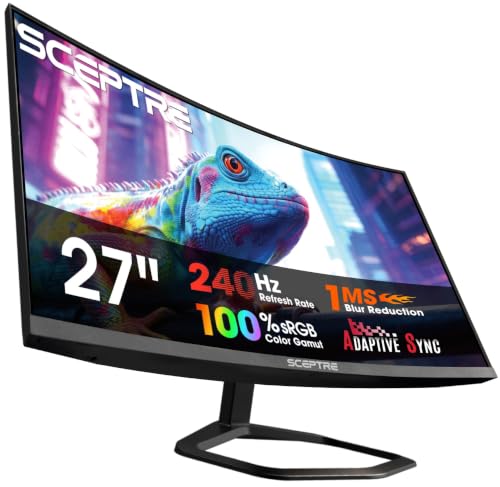 Sceptre
 27-Inch Curved Gaming Monitor, FHD 1080p, 240Hz, 1500R, DisplayPort & HDMI x2, Built-in Speakers, Machine Black (C275B-FWT240 Series, 2026)
$99.98Was:See Deal On Amazon$127.97 -
-31%
 SANSUI
 32 Inch Curved 240Hz Gaming Monitor High Refresh Rate, FHD 1080P | Gaming PC Monitor HDMI DP1.4, 1500R Curvature, 1Ms MPRT, HDR,Metal Stand,VESA Compatible(DP Cable Incl.)
$179.99List:See Deal On Amazon$259.99 -
-22%
 Sceptre
New! Sceptre 27-inch Prime Gaming Monitor DisplayPort x2 180Hz HDMI x2 180Hz Build-in Speakers, Machine Black 2027 (E275B-FW180T Series)
Limited time deal, ends Nov 19$89.97List:See Deal On Amazon$114.97 -
-38%
 Samsung
 34' Odyssey G5 Ultra-Wide Gaming Monitor with 1000R Curved Screen | 165Hz, 1ms, FreeSync Premium, Large Display, Eye Comfort, Multiple Ports, WQHD (LC34G55TWWNXZA)
$249.99List:See Deal On Amazon$399.99 -
-17%
 Samsung
 27" Odyssey G5 (G51F) Series QHD (1440P) Gaming Monitor | 180Hz, 1ms, AMD FreeSync, HDR10, Height Adj Stand, Black Equalizer, Virtual Aim Point, Auto Source Switch+ (LS27FG512ENXZA)
$179.99Was:See Deal On Amazon$217.00 -
-7%
 Dell
Dell 27 Monitor S2725QS, 4K UHD IPS, 120Hz, 5ms, FreeSync Premium | 350 cd/m2 Brightness, 1,500:1 Contrast, 99% sRGB, Anti-Glare, HDMI, DisplayPort, USB‑C, Height Adjustable, Swivel, Pivot
$279.99List:See Deal On Amazon$299.99 -
-16%
 LG
LG 27US500-W Ultrafine Monitor 27-Inch 4K UHD (3840x2160) HDR10 IPS Borderless Design Reader Mode Flicker Safe Switch App HDMI DisplayPort - White
$209.99List:See Deal On Amazon$249.99 -
-24%
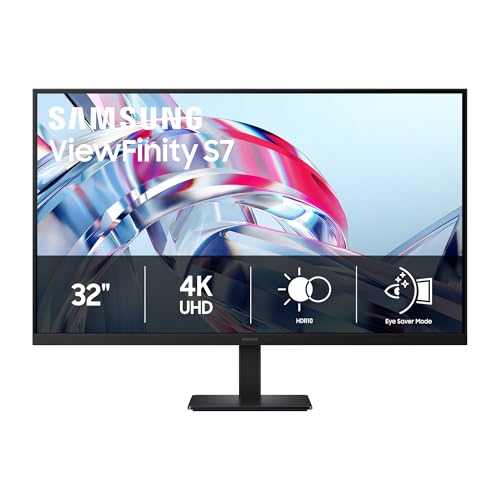 Samsung
 32" ViewFinity S7 (S70H) High-Resolution Monitor | 4K UHD (3840x2160), HDR10, Eye Saver Mode, HDMI and DP Ports, Samsung Display Manager, LS32H704EANXZA
Limited time deal, ends Nov 9$249.99List:See Deal On Amazon$329.99 -
-9%
 Dell
Dell 27 Monitor - SE2726H - 27-inch FHD (1920x1080) 144Hz 1ms Display, in-Plane Switching (IPS) Technology, AMD FreeSync™, TÜV 3-Star 2X HDMI, Tilt
$108.99List:See Deal On Amazon$119.99 -
-10%
Dell
Dell 24 Monitor - SE2426H - 23.8-inch FHD (1920x1080) 144Hz 1ms Display, in-Plane Switching (IPS) Technology, AMD FreeSync™, TÜV 3-Star 2X HDMI, Tilt
$89.99List:See Deal On Amazon$99.99
What Makes A Real Cyber Monday Monitor Deal?
Monitor listings pack in numbers, and most of them are there to make an ordinary screen look special. Start with the three that matter: resolution, refresh rate and panel type. Everything else is secondary.
A 27-inch monitor at 1080p, such as several of the 240Hz and 144Hz models on this page, has a visibly coarser image than a 27-inch 1440p or 4K panel. Those low-resolution screens are fine for fast shooters on a modest graphics card, but a price that looks good for a 240Hz label might be poor value if you mostly work in documents.
- Panel type: IPS gives better color and viewing angles, VA gives deeper contrast, and OLED gives the best blacks but costs more. A "1ms" claim usually means gray-to-gray with overdrive, not a typical real-world result.
- Curved screens: a 1500R or 1000R curve is a taste choice, and it does not make a screen better.
- HDR labels: HDR10 on an entry-level panel mostly means it accepts the signal. Without real peak brightness it adds little.
- Ports and stand: check for DisplayPort, height adjustment and VESA mounting, because they are missing on cheap models.
Of the 12 monitors in the grid, 12 are currently marked down, and the list is sorted by the size of the cut.
Which Monitor Should You Buy?
Match the monitor to the machine driving it. A 4K screen wastes itself on a graphics card that cannot push it, and a 240Hz screen wastes itself on a game that runs at 90 frames per second.
| Type | Examples on this page | Best for | Watch for |
|---|---|---|---|
| 1080p high refresh | Sceptre 22 and 27 inch, Dell SE2726HG, Dell SE2426H | Competitive shooters, budget builds | Soft text at 27 inches |
| 1440p gaming | Samsung Odyssey G5 27 inch, Samsung Odyssey G5 34 inch ultrawide | Balanced image quality and frame rates | Needs a mid-range graphics card or better |
| 4K productivity | Dell S2725QS, LG 27US500, Samsung ViewFinity S7 | Office work, photo editing, streaming | Refresh rate is often only 60Hz or 120Hz |
For a single-desk setup, a 27-inch 1440p monitor is the sweet spot for most people. The 34-inch ultrawide is better for spreadsheets and driving games, while the 4K IPS options suit anyone who reads or edits more than they play.
Gaming Monitor Deals: 144Hz, 180Hz Or 240Hz?
Gaming monitors are the biggest search cluster in this category, and the refresh rate on the box is rarely the deciding factor. Going from 60Hz to 144Hz is the jump you notice. After that, each step costs more and shows less, and your graphics card has to produce that many frames for it to matter.
The grid has examples at every level:
- 144Hz: the Dell SE2726H and SE2426H and a Sceptre 22-inch, enough for most players.
- 180Hz to 240Hz: the Sceptre Prime 27-inch, Dell SE2726HG, Sceptre 27 curved and SANSUI 32 curved, aimed at fast shooters.
- 1440p: Samsung Odyssey G5 in 27-inch and 34-inch ultrawide sizes, for sharper images at a manageable load.
Look for adaptive sync (FreeSync or G-Sync compatibility) so the screen and graphics card stay in step, and use a DisplayPort cable for the top refresh rates. If your PC cannot push 200 frames, a 240Hz label is wasted money.
Monitor Size And Resolution: 24, 27, 32 Or 34 Inch?
Size and resolution need to match. A 24 or 27-inch 1080p screen is fine for competitive play on a budget, while 27 inches at 1440p is the sweet spot for most desks. At 32 inches, 1080p looks soft, so a 4K panel such as the Samsung ViewFinity S7 makes more sense.
Productivity changes the answer. The Dell S2725QS and LG 27US500 are 4K IPS monitors, better for reading text, editing photos and splitting windows than any fast gaming panel. A 34-inch ultrawide, like the Samsung Odyssey G5, replaces two screens for spreadsheets and driving games, though it needs more desk depth.
A simple rule: pick the resolution you can drive, then the size you can sit in front of. About an arm's length from a 27-inch screen is comfortable. Before you click buy, check the ports (DisplayPort, HDMI), whether the stand tilts and adjusts in height, and whether a VESA mount is supported if you plan to use an arm.
When Do Cyber Monday Monitor Deals Drop?
Cyber Monday 2026 lands on Monday, November 30. It follows Thanksgiving on Thursday, November 26 and Black Friday on Friday, November 27.
Amazon has not yet announced its 2026 schedule. In 2025, its Black Friday Week began November 20 at 12:01 a.m. PT and ran through Cyber Monday on December 1. If it repeats that, monitor discounts could appear well before the Monday itself, though nothing is confirmed.
Computing accessories also feature in the retailer windows announced elsewhere: Best Buy plans its Cyber Monday sale for November 29 and 30, and Walmart lists Cyber Monday deals for November 30 through December 2. Our grid is Amazon only, and it refreshes with new prices every day.
Decide on size and resolution first, then compare within that group. A monitor is a purchase you live with for years, so a modest discount on the right panel beats a deep one on the wrong one. If you are building a new PC, buy the monitor after you know which graphics card is going in the box.
Frequently Asked Questions
Is a 240Hz monitor worth it over 144Hz?
Only if your graphics card can push frames that high and you play fast competitive games. For most people the jump from 60Hz to 144Hz is the big one.
What is the best gaming monitor for Cyber Monday?
It depends on your graphics card. A 27-inch 1440p monitor at 144Hz or higher suits most gaming PCs, while 1080p at 240Hz favors fast shooters on a mid-range card.
Should I buy 1080p or 1440p for a 27-inch screen?
1440p looks noticeably sharper at 27 inches. 1080p is still fine if you prioritize frame rate on a lower-end graphics card.
What size monitor is best?
For one desk, 27 inches is the common choice. Go 32 inches only with a 4K panel, and 34-inch ultrawide for spreadsheets or driving games.
Do I need a special cable for high refresh rates?
Often yes. DisplayPort or a recent HDMI cable is needed for the highest refresh rates, and the box cable is not always the right one.
Are curved monitors better for gaming?
They can feel more immersive on large or ultrawide screens, but it is personal preference, not an upgrade in picture quality.
More Computer Deals
 Cyber Monday Laptop Deals11 deals, up to 79% off
 Cyber Monday Gaming PC And Desktop Deals11 deals, up to 31% off
 Cyber Monday PC Component Deals10 deals, up to 41% off
 Cyber Monday Printer And 3D Printer Deals10 deals, up to 44% off
- Cyber Monday Software And VPN DealsDeals as they are announced
 Cyber Monday Computer Accessory Deals12 deals, up to 28% off